iOS 18 越狱及巨魔安装教程
前言
本文记录了使用 palera1n 工具对 iPad 7 进行 iOS 18 越狱,并安装巨魔商店的完整过程。
palera1n 基于 Checkm8 漏洞实现越狱。Checkm8 是一个硬件级别的 Bootrom 漏洞,存在于 A5-A11 芯片中,苹果无法通过软件更新修复。该工具在系统启动的最早期阶段劫持引导流程,实现越狱。
点击底部原文链接即可跳转视频观看
官方资源:
- • GitHub:https://github.com/palera1n/palera1n
本文测试环境:
支持设备列表
上述设备中,只有 iPad 7 能够升级到 iOS 18 系统,因此选择它作为越狱设备。
palera1n 常用命令
Rootless 模式(推荐)
目前主流的越狱方式,不修改系统分区,不占用大量存储空间。
首次越狱 / 引导启动:
palera1n -l
-l 表示 rootless 模式。首次运行进行越狱安装,设备重启后再次运行此命令恢复越狱状态。
Rootful 模式(传统方式)
如果需要修改系统文件(某些老旧插件必须写根目录),使用此模式。注意:会占用约 10-15GB 存储空间。
第一步:创建环境(仅首次)
palera1n -f -c
-f 表示 fakefs(伪造文件系统),-c 表示 create(创建)。运行完成后设备会自动重启。
第二步:引导启动(日常使用)
palera1n -f
每次重启设备后,运行此命令激活越狱环境。
救砖与维护命令
进入安全模式:
# Rootless 模式palera1n -l -s# Rootful 模式palera1n -f -s
-s 表示 safe mode。启动时不加载任何插件,用于卸载导致崩溃的插件。
清除越狱(恢复纯净系统):
palera1n --force-revert
彻底删除越狱环境、Loader 和已安装的插件。
辅助命令
# 查看详细日志palera1n -V# 查看设备信息palera1n -i# 退出 Recovery 模式palera1n -n
命令速查表
| | |
|---|
palera1n -l | | |
palera1n -l -s | | |
palera1n --force-revert | | |
palera1n -f -c | | |
palera1n -f | | |
开始越狱
1. 下载工具
根据电脑系统下载对应版本的 palera1n,Intel Mac 下载 palera1n-macos-x86_64。
2. 执行越狱
打开终端,运行:
xattr -c palera1n-macos-x86_64chmod 777 palera1n-macos-x86_64./palera1n-macos-x86_64 -l
按照提示操作:
看到 Booting Kernel... 后,越狱完成,等待设备重启。
palera1n 图标大约 1 分钟后出现在桌面。
常见问题: 如果提示 error code: -status_open_device_error,手动重启设备后重试。
muyang@Mac-Pro Downloads % ./palera1n-macos-x86_64 -l## palera1n: v2.2.1## ======== Made by =======# Made by: Nick Chan, Ploosh, Khcrysalis, Mineek, staturnz, kok3shidoll, HAHALOSAH# ======== Thanks to =======# Thanks to: llsc12, Nebula, Lrdsnow, nikias (libimobiledevice),# checkra1n team (Siguza, axi0mx, littlelailo et al.),# Procursus Team (Hayden Seay, Cameron Katri, Keto et.al)# ========================== - [01/09/26 11:29:30] <Info>: Waiting for devices - [01/09/26 11:29:30] <Info>: Entering recovery mode - [01/09/26 11:29:41] <Info>: Press Enter when ready for DFU modeHold home + power button (0)Hold home button (3) - [01/09/26 11:30:00] <Info>: Device entered DFU mode successfully - [01/09/26 11:30:00] <Info>: About to execute checkra1n## Checkra1n 0.1337.3## Proudly written in nano# (c) 2019-2023 Kim Jong Cracks##======== Made by =======# argp, axi0mx, danyl931, jaywalker, kirb, littlelailo, nitoTV# never_released, nullpixel, pimskeks, qwertyoruiop, sbingner, siguza#======== Thanks to =======# haifisch, jndok, jonseals, xerub, lilstevie, psychotea, sferrini# Cellebrite (ih8sn0w, cjori, ronyrus et al.)#========================== - [01/09/26 11:45:48] <Verbose>: Starting thread for Apple TV 4K Advanced board - [01/09/26 11:45:48] <Info>: Waiting for DFU mode devices - [01/09/26 11:45:48] <Verbose>: DFU mode device found - [01/09/26 11:45:48] <Info>: Checking if device is ready - [01/09/26 11:45:48] <Verbose>: Attempting to perform checkm8 on 8010 11 - [01/09/26 11:45:48] <Info>: Setting up the exploit - [01/09/26 11:45:48] <Verbose>: == checkm8 setup stage == - [01/09/26 11:45:48] <Verbose>: Entered initial checkm8 state after 1 steps - [01/09/26 11:45:48] <Verbose>: Stalled input endpoint after 8 steps - [01/09/26 11:45:48] <Verbose>: DFU mode device disconnected - [01/09/26 11:45:48] <Verbose>: DFU mode device found - [01/09/26 11:45:48] <Verbose>: == checkm8 trigger stage == - [01/09/26 11:45:49] <Info>: Checkmate! - [01/09/26 11:45:49] <Verbose>: Device should now reconnect in download mode - [01/09/26 11:45:49] <Verbose>: DFU mode device disconnected - [01/09/26 11:45:55] <Info>: Entered download mode - [01/09/26 11:45:55] <Verbose>: Download mode device found - [01/09/26 11:45:55] <Info>: Booting PongoOS... - [01/09/26 11:45:57] <Info>: Found PongoOS USB Device - [01/09/26 11:45:59] <Info>: Booting Kernel...
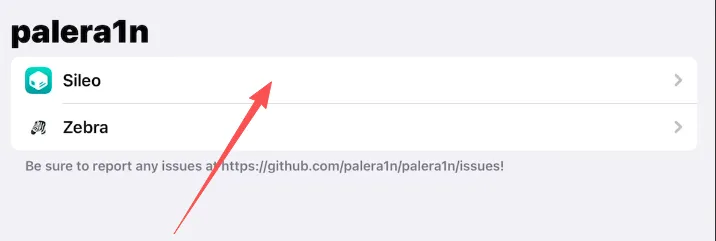
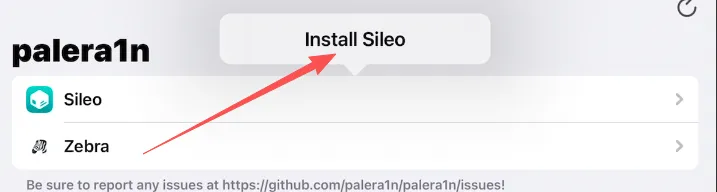
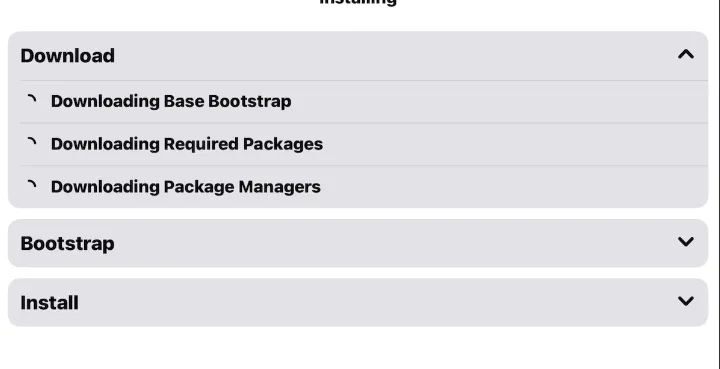
安装 Sileo 商店
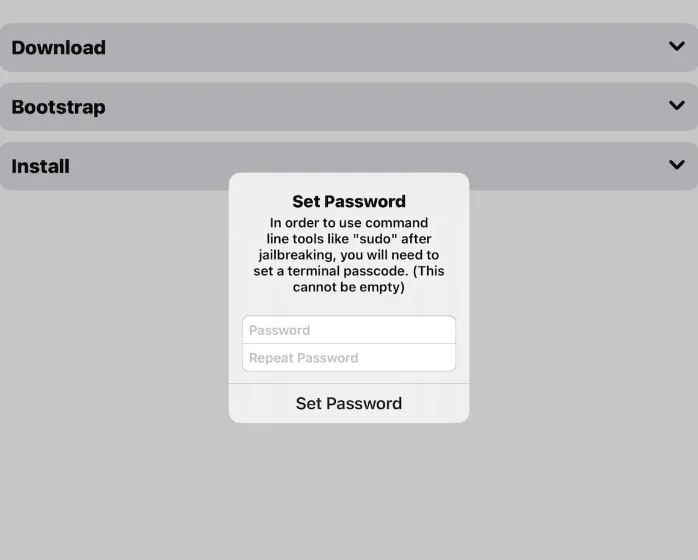
- 3. 跳转设置界面,设置 sudo 密码(务必记住,默认可设为
alpine)

 10个月宝宝每天需要喝多少奶粉?