鸿蒙音频播放器第四弹:倒计时停止功能,课间十分钟和睡前听音乐的好选择
- 2026-08-24 07:37:07
鸿蒙音频播放器第四弹:倒计时停止功能,课间十分钟和睡前听音乐的好选择课间十分钟结束,学校播放的背景音乐自动停止;睡前听半小时轻音乐,半小时后自动关闭;这些实用的功能,都已在我们EZ播放器的1.0.4版本实现。 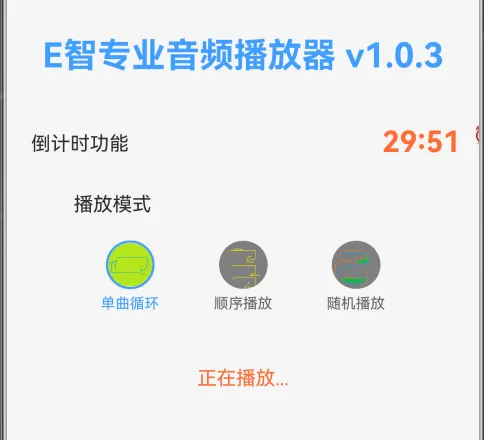
倒计时的核心是
在v1.0.4版本中,播放器状态发生了较大的改动,与倒计时状态互相作用: 简单的状态变化如下图所示:开始播放时,倒计时状态置为true; 倒计时结束时,播放停止。当停止播放时,倒计时停止,再次开始时,重新计时。本版本暂未实现点击暂停播放音乐时,暂停倒计时,后续版本实现。 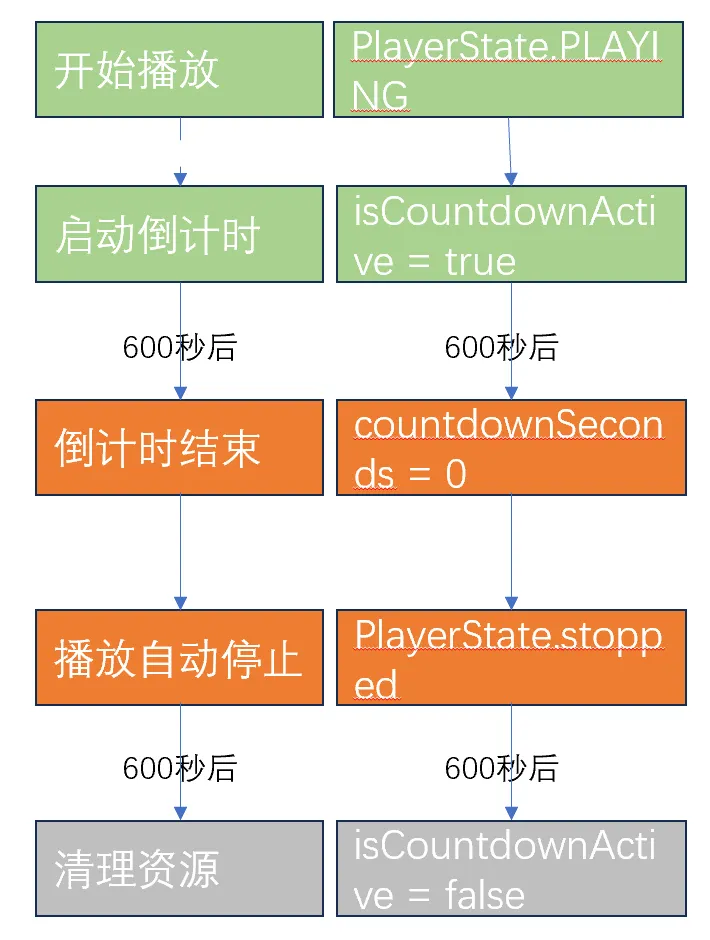
当前版本虽然实现了倒计时停止播放的基础功能,但还有很多约束和显示: 1. 倒计时时间固定,不能灵活设置; 2. 暂停不暂停,有点绕口,意思是暂停播放时,倒计时并不停止,而是继续计时; 我们将在v1.0.5版本优先实现播放列表的功能,并在后续版本中继续优化倒计时,还有什么希望实现的功能,请在评论区留言哦。 五、实现效果在此: 鸿蒙系统音频播放器实现倒计时停止功能 六、播放器演进往期链接: 让我们的APP变得“声”动活泼--在鸿蒙系统实现音频播放 给音频播放器增加音量离散控制功能--setVolume方法 鸿蒙音频播放器第三弹:更加丝滑的音量控制和一往情深的单曲循环
一、播放倒计时:解决真实场景痛点
想象一下:
睡前放松:想听音乐入睡,又不想整夜播放
课间休息:10分钟休息时间,到点自动停止
专注工作:番茄工作法,25分钟专注后自动提醒
v1.0.4版本实现的30分钟固定倒计时,正是为这些场景量身打造(后续实现倒计时事件可调)。
二、倒计时的实现:三个状态变量+定时器
1. 需要增加3个状态变量:剩余秒数,是否激活,定时器引用。
// v1.0.4 倒计时功能相关状态@State countdownSeconds: number = 600; // 剩余秒数(10分钟=600秒)@State isCountdownActive: boolean = false; // 倒计时是否激活private countdownTimer: number | null = null; // 定时器引用
其中countdownTimer是JavaScript的定时器引用,使用时要注意正确管理,防止内存泄漏。
2. 实现核心方法:
倒计时的核心是startCountdown()方法
// v1.0.4 启动倒计时startCountdown() {// 1. 清理可能存在的旧计时器this.clearCountdown();// 2. 重置为10分钟并激活this.countdownSeconds = 600;this.isCountdownActive = true;// 3. 启动每秒更新的定时器this.countdownTimer = setInterval(() => {if (this.countdownSeconds > 0) {this.countdownSeconds--; // 每秒减1// 4. 倒计时结束处理if (this.countdownSeconds === 0) {this.stopAudio(); // 自动停止播放this.clearCountdown(); // 清理资源}}}, 1000);}
setInterval的特点:不需要递归调用,可随时停止(clearInterval),适合固定间隔的周期任务。
3. 状态机的变化:
变换点1:开始播放 → 启动倒计时
async playRawFileAudio() {// ... 初始化播放器代码// v1.0.4 启动倒计时this.startCountdown(); // 播放开始时启动倒计时}
变换点2:倒计时结束 → 自动停止
// 在倒计时结束回调中if (this.countdownSeconds === 0) {if (this.avPlayer && this.playerState === PlayerState.PLAYING) {this.stopAudio(); // 自动调用stop()方法}}
三、倒计时的注意点
1. 资源必须释放
clearCountdown() {if (this.countdownTimer) {clearInterval(this.countdownTimer); // 必须清理!this.countdownTimer = null;}}
如忘记清理定时器会导致内存泄漏,特别是在组件销毁时:
aboutToDisappear() {this.clearCountdown(); // 必须调用this.releasePlayer();}
四、当前版本限制与v1.0.5展望
本文来自网友投稿或网络内容,如有侵犯您的权益请联系我们删除,联系邮箱:596563534@qq.com 。
随机文章
-
 10个月宝宝每天需要喝多少奶粉?
- 高清无广告追剧安卓免费影视软件盘点
- 微信主题皮肤设置安卓系统
- 安卓TV观影神器合集全家老小追剧超便捷
- 安卓微信 8.0.68 正式版发布,通知头像、视频号等优化
- 安卓影视APP新宠无广告4K超清全VIP特权畅享
- 推荐:同济3D3S钢结构设计软件 V2026.03版 【2025.12】最新版 全模块,钢结构加固、欧美规范验算、SOILD、节点计算均支持
- 【便携软件】坚持13年的免费12306分流抢票助手,出行回家必备神器,强烈
- 月入过万!五险一金+周末双休...红有软件股份有限公司热招中!另5家企业招聘中
- 基于质控品定量测定IQC程序设计软件推介
- 想下载期货开户APP却不知哪款好?看这里,靠谱期货开户APP及教程来啦