鸿蒙 ArkUI 实战:打造 AI 对话流式打字机效果
- 2026-08-20 05:47:59
鸿蒙 ArkUI 实战:打造 AI 对话流式打字机效果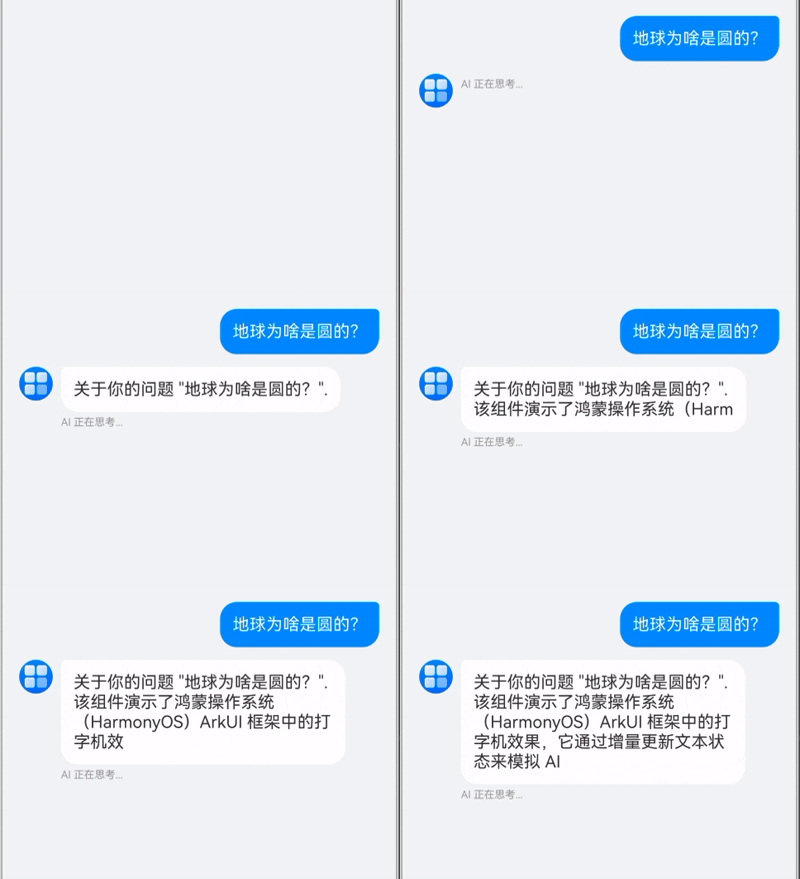
在开发 AI 对话应用时,"打字机效果"是提升用户体验的关键。它能让 AI 的回复看起来像是在实时思考和输入,而不是生硬地一次性抛出大段文字。
本文记录了在 HarmonyOS ArkUI 中实现该效果的全过程,详细介绍了前端模拟流式和真实服务端流式两种场景的实现方案,并附带完整源码。
1. 核心原理
打字机效果的本质是增量更新 UI。无论是哪种场景,核心流程都是一样的:
1. 创建消息占位符:用户发送消息后,立即在列表末尾添加一条内容为空的 AI 消息(状态为 isTyping: true)。2. 增量追加内容: • 模拟流式:前端拿到完整文本后,使用定时器( setInterval)将字符逐个追加到消息内容中。• 真实流式:监听网络流(SSE/WebSocket),每收到一个 Chunk,就将其追加到消息内容中。 3. 局部刷新:利用 ArkUI 的 @ObjectLink机制,确保只有最后一条消息的气泡在重绘,避免整个列表闪烁。
2. 遇到的坑与解决方案
坑点一:UI 闪烁问题
最初的实现中,我们在 ForEach 渲染列表时,使用了内容长度作为 Key:
// 错误示范:内容长度变化导致 Key 变化ForEach(this.messages, (msg) => { ... }, (msg) => msg.id + msg.content.length)现象:每次追加字符,ArkUI 认为这是一个全新的组件,销毁并重建 ListItem,导致头像和气泡疯狂闪烁。
解决:使用稳定的唯一 ID 作为 Key。
// 正确做法:Key 保持不变,复用组件ForEach(this.messages, (msg) => { ... }, (msg) => msg.id)坑点二:文字不更新
修复了闪烁后,发现文字不再更新了。
原因:ArkUI 的 @State 装饰器默认只监听数组本身的增删(push/pop)或对象引用的替换。当我们修改数组元素的属性(msg.content += 'a')时,@State 监听不到。
解决:使用 @Observed 和 @ObjectLink 机制。
1. 数据模型:用 @Observed装饰ChatMessage类。2. 子组件:将消息气泡封装为 MessageItemView,使用@ObjectLink接收消息对象。
3. 场景实现详解
场景 A:服务器一次性返回完整文本(前端模拟流式)
这是最常见的过渡方案。后端 API 是普通的 HTTP 接口,返回完整的 JSON 字符串。前端为了体验好,人为制造"打字感"。
实现逻辑:
1. 发起 HTTP 请求, await等待结果返回。2. 拿到完整字符串 fullText。3. 启动定时器,每隔 50ms 截取一个字符追加到当前消息中。
// 伪代码const fullText = await api.askAI(question);let index = 0;setInterval(() => {if (index < fullText.length) { currentMsg.content += fullText[index]; // @ObjectLink 触发刷新 index++; }}, 50);场景 B:服务器真实流式返回(SSE / WebSocket)
这是 AI 应用的最佳实践。服务器使用 Server-Sent Events (SSE) 或 WebSocket 实时推送 Token。
实现逻辑:
1. 建立连接(如 http.createHttp()或 WebSocket)。2. 监听数据包事件( on('data')或on('message'))。3. 每收到一个数据包,直接追加到当前消息。
// 伪代码// 假设使用 SSE 或类似流式协议stream.on('data', (chunk) => {// 直接追加 chunk,无需定时器 currentMsg.content += chunk; scrollToBottom();});4. 完整代码
可以直接复制以下代码到 AIChatView.ets 文件中使用。
import { util } from'@kit.ArkTS';// 1. 数据模型:必须使用 @Observed 装饰@ObservedexportclassChatMessage {id: string;content: string;role: 'user' | 'ai';isTyping: boolean;constructor(content: string, role: 'user' | 'ai', isTyping: boolean = false) {this.id = Date.now().toString() + Math.random().toString();this.content = content;this.role = role;this.isTyping = isTyping; }}// 2. 子组件:消息气泡,使用 @ObjectLink 监听属性变化@Componentstruct MessageItemView {@ObjectLinkmsg: ChatMessage;build() {Row() {if (this.msg.role === 'user') {Blank()Text(this.msg.content) .fontSize(16) .fontColor(Color.White) .backgroundColor('#007DFF') .padding(12) .borderRadius({ topLeft: 16, topRight: 4, bottomLeft: 16, bottomRight: 16 }) .constraintSize({ maxWidth: '80%' }) } else {Row({ space: 8 }) {Image($r('app.media.startIcon')) // 请替换为实际图标资源 .width(32) .height(32) .borderRadius(16) .backgroundColor('#E0E0E0')Column() {if (this.msg.content.length > 0 || !this.msg.isTyping) {Text(this.msg.content) .fontSize(16) .fontColor('#333') .backgroundColor(Color.White) .padding(12) .borderRadius({ topLeft: 4, topRight: 16, bottomLeft: 16, bottomRight: 16 }) }if (this.msg.isTyping) {Text('AI 正在思考...') .fontSize(10) .fontColor('#999') .margin({ top: 4 }) } } .alignItems(HorizontalAlign.Start) .constraintSize({ maxWidth: '80%' }) } .alignItems(VerticalAlign.Top)Blank() } } .width('100%') }}// 3. 主组件:聊天界面@Componentexport struct AIChatView {@Statemessages: ChatMessage[] = [];@StateinputValue: string = '';privatescroller: Scroller = newScroller();privatetimer: number = -1;build() {Column() {// 聊天列表List({ scroller: this.scroller, space: 12 }) {ForEach(this.messages, (msg: ChatMessage) => {ListItem() {MessageItemView({ msg: msg }) } }, (msg: ChatMessage) => msg.id) // 关键:使用唯一 ID } .layoutWeight(1) .width('100%') .padding(16) .alignListItem(ListItemAlign.Start)// 底部输入栏Row({ space: 12 }) {TextInput({ text: this.inputValue, placeholder: 'Ask AI something...' }) .layoutWeight(1) .backgroundColor('#F5F5F5') .borderRadius(20) .onChange((value: string) => {this.inputValue = value; }) .onSubmit(() => {this.sendMessage(); })Button('发送') .type(ButtonType.Capsule) .backgroundColor('#007DFF') .onClick(() => {this.sendMessage(); }) .enabled(this.inputValue.trim().length > 0) } .width('100%') .padding(12) .backgroundColor(Color.White) .shadow({ radius: 4, color: '#1A000000', offsetY: -2 }) } .width('100%') .height('100%') .backgroundColor('#F1F3F5') }// 模拟网络请求 (仅用于演示场景 A)mockNetworkRequest(query: string): Promise<string> {returnnewPromise((resolve) => {setTimeout(() => {resolve(`关于你的问题 "${query}". 该组件演示了鸿蒙操作系统(HarmonyOS)ArkUI 框架中的打字机效果,它通过增量更新文本状态来模拟 AI 流式响应。`); }, 1000); }); }asyncsendMessage() {if (this.inputValue.trim() === '') return;// 1. 添加用户消息const userMsg = newChatMessage(this.inputValue, 'user');this.messages.push(userMsg);const userQuery = this.inputValue;this.inputValue = '';this.scrollToBottom();// 2. 创建一个空的 AI 消息 (Loading 状态)const aiMsg = newChatMessage('', 'ai', true);this.messages.push(aiMsg);// --- 分支:选择场景 A 或 B ---// 场景 A: 模拟流式 (获取完整文本 -> 前端切分)const serverResponse = awaitthis.mockNetworkRequest(userQuery);this.startTypewriterEffect(serverResponse);// 场景 B: 真实流式 (监听网络事件 -> 调用 appendStreamContent)// 伪代码示例:// const stream = await api.stream(userQuery);// stream.on('data', (chunk) => this.appendStreamContent(chunk)); }scrollToBottom() {setTimeout(() => {this.scroller.scrollEdge(Edge.Bottom); }, 100); }// [场景 A 实现] 前端定时器模拟打字机startTypewriterEffect(fullText: string) {let currentIndex = 0;if (this.timer !== -1) clearInterval(this.timer);this.timer = setInterval(() => {const lastMsgIndex = this.messages.length - 1;if (lastMsgIndex < 0) {clearInterval(this.timer);return; }if (currentIndex < fullText.length) {this.messages[lastMsgIndex].content += fullText[currentIndex]; currentIndex++;this.scrollToBottom(); } else {clearInterval(this.timer);this.timer = -1;this.messages[lastMsgIndex].isTyping = false; } }, 50); }// [场景 B 实现] 真实流式数据追加appendStreamContent(chunk: string) {const lastMsgIndex = this.messages.length - 1;if (lastMsgIndex >= 0 && this.messages[lastMsgIndex].role === 'ai') {this.messages[lastMsgIndex].content += chunk;this.scrollToBottom(); } }}
本文来自网友投稿或网络内容,如有侵犯您的权益请联系我们删除,联系邮箱:wyl860211@qq.com 。
随机文章
-
 10个月宝宝每天需要喝多少奶粉?
- 影视“特殊”版!安卓苹果电视三端【永久可用】建议收藏!
- 短视频去水印神器 v1.7.6安卓版,支持视频图片无痕擦除,内置剪辑工具与LOGO添加功能
- 参数赢了,市场输了:安卓旗舰为何干不过“挤牙膏”的iPhone?
- 短视频去水印神器 v1.7.6安卓版,支持视频图片无痕擦除,内置剪辑工具与LOGO添加功能
- 安卓WiseMeal AI健康管理 v1.1.6解锁高级版,拍照识食物,精准分析营养成分,科学管理每日摄入
- 安卓WiseMeal AI健康管理 v1.1.6解锁高级版,拍照识食物,精准分析营养成分,科学管理每日摄入
- 在俄安卓用户注意!谷歌官方预警:旧系统可能正“出卖”你!
- 安卓家常菜做法大全 v6.6.9,去广告版,数十万道菜谱覆盖八大菜系,图文详解轻松上手
- 在俄安卓用户注意!谷歌官方预警:旧系统可能正“出卖”你!
- 安卓家常菜做法大全 v6.6.9,去广告版,数十万道菜谱覆盖八大菜系,图文详解轻松上手

