🤌 Jetpack Compose 手势与触摸交互实战示例
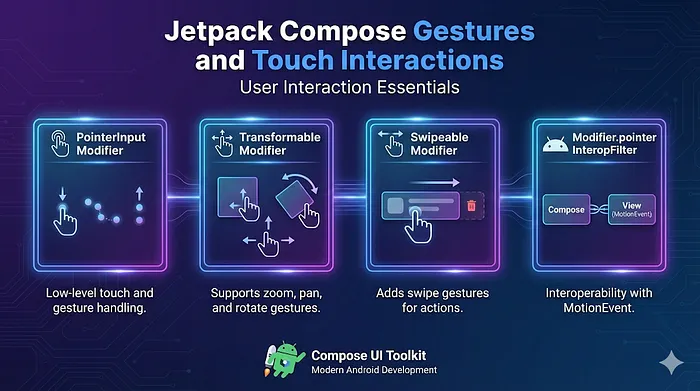
现代 UI 本质上是触摸驱动的。Jetpack Compose 提供了非常丰富的手势 API,从简单的点击,到复杂的缩放平移交互全都覆盖。本文就带你快速上手常用的几种手势用法。
1️⃣ Modifier.pointerInput — 底层手势检测
你可以通过挂起函数手势检测器,来实现点击、长按、拖拽等各种自定义手势检测。
@Composable
fun PointerInputExample() {
    Box(
        modifier = Modifier
            .size(200.dp)
            .background(Color.LightGray)
            .pointerInput(Unit) {
                detectTapGestures(
                    onTap = { offset ->
                        println("点击位置: $offset")
                    },
                    onLongPress = {
                        println("触发长按!")
                    }
                )
            }
    ) {
        Text("点击或长按", modifier = Modifier.align(Alignment.Center))
    }
}
// 需要对触摸行为做精细控制时使用
2️⃣ Modifier.transformable — 平移、缩放、旋转
这个修饰符专门用来处理双指缩放旋转手势,非常适合实现图片、地图这类交互。
@Composable
fun TransformableExample() {
    var scale by remember { mutableStateOf(1f) }
    var rotation by remember { mutableStateOf(0f) }
    var offset by remember { mutableStateOf(Offset.Zero) }

    val state = rememberTransformableState { zoomChange, rotationChange, offsetChange ->
        scale *= zoomChange
        rotation += rotationChange
        offset += offsetChange
    }

    Box(
        modifier = Modifier
            .size(250.dp)
            .graphicsLayer(
                scaleX = scale,
                scaleY = scale,
                rotationZ = rotation,
                translationX = offset.x,
                translationY = offset.y
            )
            .background(Color.Cyan)
            .transformable(state)
    ) {
        Text("双指缩放/拖拽/旋转", modifier = Modifier.align(Alignment.Center))
    }
}
// 需要引入依赖:implementation "androidx.compose.foundation:foundation:..."
3️⃣ Modifier.swipeable — 滑动控制 UI
可以用来实现滑动操作,比如侧滑删除、滑动切换、侧滑面板这类效果。
@Composable
fun SwipeableExample() {
    val width =300f
    val swipeState = rememberSwipeableState(0)
    val anchors = mapOf(0f to 0, width to 1)

    Box(
        modifier = Modifier
            .width(width.dp)
            .height(100.dp)
            .background(Color.LightGray)
            .swipeable(
                state = swipeState,
                anchors = anchors,
                thresholds = { _, _ -> FractionalThreshold(0.3f) },
                orientation = Orientation.Horizontal
            )
    ) {
        Box(
            modifier = Modifier
                .offset { IntOffset(swipeState.offset.value.roundToInt(), 0) }
                .fillMaxSize()
                .background(Color.Green)
        ) {
            Text("滑动我", modifier = Modifier.align(Alignment.Center))
        }
    }
}
// 不要过度使用,如果是列表类滑动优先使用 Draggable 或 LazyRow
4️⃣ Modifier.pointerInteropFilter — 处理原生 MotionEvent
有时候你需要和传统 Android 触摸系统做兼容,这时候就可以用这个修饰符直接拿到原生事件。
@Composable
fun PointerInteropExample() {
    Box(
        modifier = Modifier
            .size(200.dp)
            .background(Color.Yellow)
            .pointerInteropFilter {
                when (it.action) {
                    MotionEvent.ACTION_DOWN -> {
                        println("手指按下,位置: ${it.x},  ${it.y}")
                        true
                    }

                    MotionEvent.ACTION_UP -> {
                        println("手指抬起!")
                        true
                    }

                    else-> false
                }
            }
    ) {
        Text("原生触摸交互", modifier = Modifier.align(Alignment.Center))
    }
}
// 在接入旧视图或原生手势逻辑时非常有用
总结
| API | 适用场景 |
|---|
pointerInput | 点击、拖拽、长按等自定义手势,底层精细控制 |
transformable | 双指缩放、旋转、拖拽(图片、地图场景) |
swipeable | 滑动操作(切换开关、侧滑删除、侧滑面板) |
pointerInteropFilter | 对接原生 Android MotionEvent,兼容旧代码 |
👉 推荐阅读:68+ 好用到爆的 Jetpack Compose 组件与修饰符,帮你大幅提升 Android 开发效率。
原文链接:https://medium.com/@ashfaque-khokhar/jetpack-compose-12-gestures-and-touch-interactions-with-examples-dc7e72678d11


