鸿蒙音频播放器第三弹:更加丝滑的音量控制和一往情深的单曲循环
- 2026-10-11 06:12:25
鸿蒙音频播放器第三弹:更加丝滑的音量控制和一往情深的单曲循环滑动指尖,随心所变;一曲循环,情意无限 让我们的APP变得“声”动活泼--在鸿蒙系统实现音频播放 给音频播放器增加音量离散控制功能--setVolume方法 上一版我们为鸿蒙音频播放器添加了按钮式音量控制。今天我们实现两个更专业的功能:Slider滑动条音量控制和单曲循环播放模式。这会大幅提升我们播放器的体验! 新版本的播放器具备如下功能: 1. 滑动音量控制;2. 播放模式选择;3. 单曲循环功能; 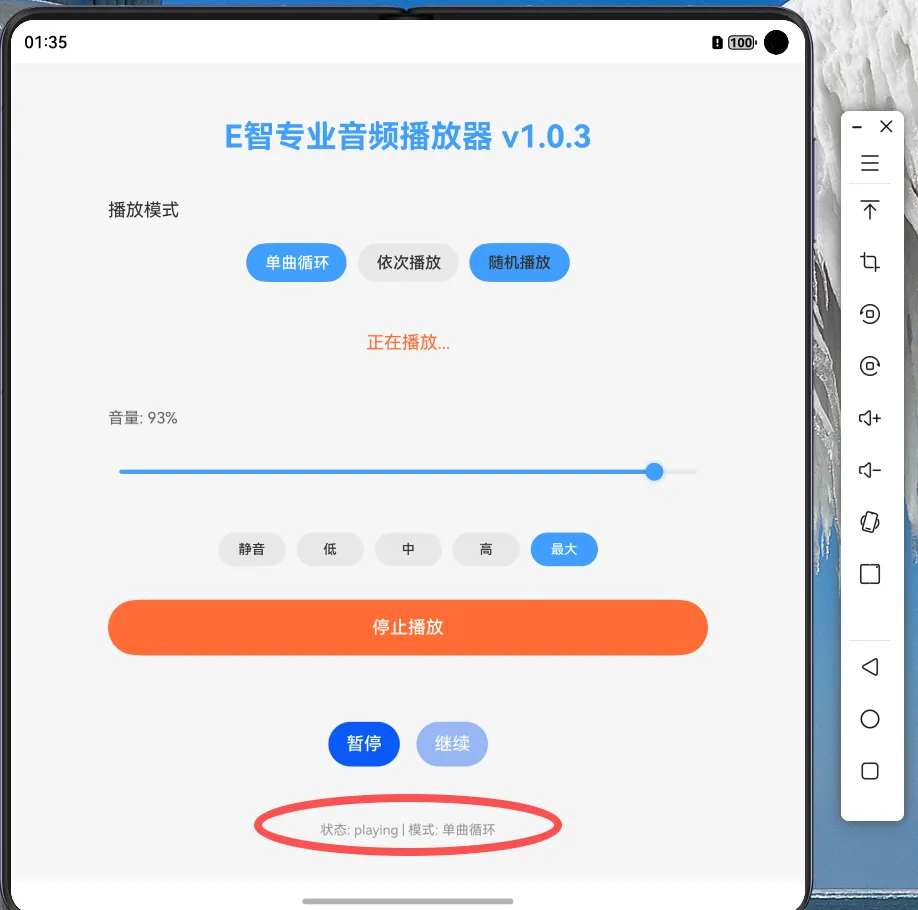
单曲循环的改动主要在
Now,运行启动播放器,拖动Slider调节音量,找一首自己喜欢的音乐,享受单曲循环的快乐吧!(我播放的还是小赵喜欢的“苟活”)。
一、成品效果
二、Slider组件:循序渐进的音量变化
Slider(滑动条)是鸿蒙ARK UI框架一个交互组件,允许用户通过拖动滑块的方式在指定范围内选择数值,相比于按钮的离散值,Slider可以提供连续、直观的操作体验。
1. Slide的主要属性
Slider({value: this.currentVolume, // 当前值(绑定状态变量)min: 0, // 最小值max: 1, // 最大值step: 0.01, // 步长(拖动精度)style: SliderStyle.OutSet // 样式:OutSet或InSet})
value双向绑定:Slider可以显示
currentVolume的当前值,而当用户拖动滑块时又更新urrentVolume的值。精细控制:step=0.01意味着100个调节档位
视觉风格:选择OutSet样式可以让滑块"浮"在轨道上,看起来更清晰。
2. 样式定制:美观实用
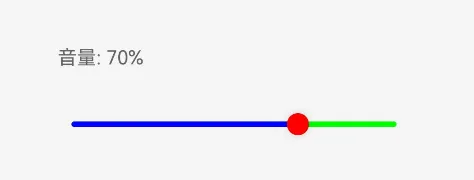
.blockColor('red') // 滑块颜色.selectedColor('blue') // 已选择轨道颜色.trackColor('orange') // 未选择轨道颜色
可以通过颜色属性调整Slide的样式,如下图,用户可以清晰的看到当前选择的音量(当然,一般来说UI设计不会这么配色,咱是为了演示效果):
三、单曲循环:绕梁三日而不绝
1. 原理:状态机思维
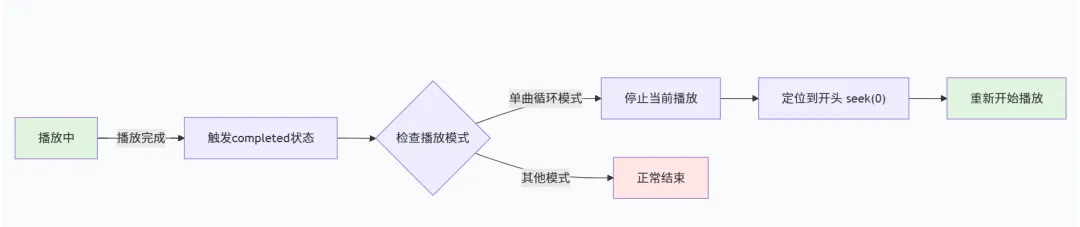
单曲循环,当一首音乐播放完成后,重新打开继续播放,那么实现上应该是监听播放完成事件,当出现播放完成(complete)然后重新开始。这需要理解AVPlayer的状态流转,我们再回顾一下:
2. 关键代码:状态回调改造
单曲循环的改动主要在setAVPlayerCallbacks方法中,我们重点修改了completed状态的处理:
case 'completed':console.info('播放完成,当前模式:', this.playMode);// 单曲循环处理逻辑if (this.playMode === PlayMode.SINGLE_LOOP) {this.updateStatus('单曲循环,重新播放...');console.info('执行单曲循环,重新开始播放');// 关键三步曲:try {// this.avPlayer!.stop(); // 1. 停止this.avPlayer!.seek(0); // 2. 回到开头this.avPlayer!.play(); // 3. 重新播放this.playerState = PlayerState.PLAYING;} catch (error) {console.error('单曲循环失败:', error);this.playerState = PlayerState.ERROR;}} else {// 其他模式:正常结束this.playerState = PlayerState.COMPLETED;this.updateStatus('播放完成');await this.releasePlayer();}break;
起初的设想是,应该先释放上次播放的资源,把播放器彻底停止(stop)后,再重新启动(play),但实验了一下无法启动,所以最后在调试的时候,去掉了stop这个步骤,先实现功能。后续再研究下,看有没有好的方法。
预先增加了一个播放模式的枚举,作为后续演进的方向,待增加播放列表后,可以实现随机播放和顺序播放另外两个模式。
enum PlayMode {SINGLE_LOOP = 'single_loop', // 单曲循环SEQUENTIAL = 'sequential', // 依次播放(预留)RANDOM = 'random' // 随机播放(预留)}
最后,我们对比下今天优化后的1.0.3版本和1.0.2版本的改进点。
1. 音量控制,由5档控制改为滑动连续变化(无级变速)
2. 播放模式,上版本无播放模式,本版本增加了三种模式
3. 状态反馈,之前有播放和停止等状态,新版本增加了播放模式状态的显示
4. 音乐播放,之前播放完成后停止,新版本可以支持循环播放。
完整代码:
import { media } from '@kit.MediaKit';import { common } from '@kit.AbilityKit';import { BusinessError } from '@kit.BasicServicesKit';// 播放器状态枚举//增加了按钮控制音量功能enum PlayerState { IDLE = 'idle', // 空闲状态 PREPARING = 'preparing', // 准备中 PLAYING = 'playing', // 播放中 PAUSED = 'paused', // 已暂停 STOPPED = 'stopped', // 已停止 COMPLETED = 'completed', // 播放完成 ERROR = 'error' // 错误状态}// 播放模式枚举 v1.0.3enum PlayMode { SINGLE_LOOP = 'single_loop', // 单曲循环 SEQUENTIAL = 'sequential', // 依次播放 RANDOM = 'random' // 随机播放}@Entry@Componentstruct AudioPlayerDemo { private avPlayer: media.AVPlayer | null = null; // 获取UIAbility的Context private context: common.UIAbilityContext = getContext(this) as common.UIAbilityContext; @State statusMessage: string = '点击播放按钮开始播放'; @State playerState: PlayerState = PlayerState.IDLE; // 使用枚举状态 //增加状态变量,表示音量 @State currentVolume: number = 0.5; @State playMode: PlayMode = PlayMode.SINGLE_LOOP; // v1.0.3 默认单曲循环 build() { Column({ space: 20 }) { Text('E智专业音频播放器 v1.0.3') .fontSize(28) .fontWeight(FontWeight.Bold) .margin({ top: 30, bottom: 20 }) .fontColor('#409EFF') // v1.0.3 播放模式选择器 Text('播放模式').fontSize(16).width('80%').textAlign(TextAlign.Start) Row({ space: 10 }) { Button('单曲循环') .width(90).height(35) .backgroundColor(this.playMode === PlayMode.SINGLE_LOOP ? '#409EFF' : '#E8E8E8') .fontColor(this.playMode === PlayMode.SINGLE_LOOP ? Color.White : '#333') .onClick(() => { this.playMode = PlayMode.SINGLE_LOOP; }) Button('依次播放') .width(90).height(35) .backgroundColor(this.playMode === PlayMode.SEQUENTIAL ? '#409EFF' : '#E8E8E8') .fontColor(this.playMode === PlayMode.SEQUENTIAL ? Color.White : '#333') .onClick(() => { this.playMode = PlayMode.SEQUENTIAL; }) Button('随机播放') .width(90).height(35) .backgroundColor(this.playMode === PlayMode.RANDOM ? '#409EFF' : '#409EFF') .fontColor(this.playMode === PlayMode.RANDOM ? Color.White : '#333') .onClick(() => { this.playMode = PlayMode.RANDOM; }) } .margin({ bottom: 25 }) Text(this.statusMessage) .fontSize(16) .fontColor(this.playerState === PlayerState.PLAYING ? '#FF6B35' : '#666') .margin({ bottom: 30 }) // v1.0.3 音量控制区域 Text(`音量: ${Math.round(this.currentVolume * 100)}%`) .fontSize(14).fontColor('#666').width('80%').textAlign(TextAlign.Start) // v1.0.3 Slider音量控制条 Slider({ value: this.currentVolume, min: 0, max: 1, step: 0.01, style: SliderStyle.OutSet }) .width('80%') .height(40) .blockColor('red') .selectedColor('blue') .trackColor('green') .showSteps(false) .onChange((value: number) => { this.changeVolume(value); }) .margin({ bottom: 15 }) // Text(this.currentVolume.toString()) // .fontColor('green') // .fontSize(16) // 音量预设按钮 Row({ space: 10 }) { Button('静音') .width(60) .height(30) .fontSize(12) .backgroundColor('#E8E8E8') .fontColor('#333') .onClick(() => { this.changeVolume(0); }) Button('低') .width(60) .height(30) .fontSize(12) .backgroundColor('#E8E8E8') .fontColor('#333') .onClick(() => { this.changeVolume(0.25); }) Button('中') .width(60) .height(30) .fontSize(12) .backgroundColor('#E8E8E8') .fontColor('#333') .onClick(() => { this.changeVolume(0.5); }) Button('高') .width(60) .height(30) .fontSize(12) .backgroundColor('#E8E8E8') .fontColor('#333') .onClick(() => { this.changeVolume(0.75); }) Button('最大') .width(60) .height(30) .fontSize(12) .backgroundColor('#409EFF') .fontColor(Color.White) .onClick(() => { this.changeVolume(2.0); }) } .margin({ bottom: 10 }) Button(this.playerState === PlayerState.PLAYING ? '停止播放' : '播放音频') .width('80%') .height(50) .backgroundColor(this.playerState === PlayerState.PLAYING ? '#FF6B35' : '#409EFF') .fontColor(Color.White) .onClick(() => { if (this.playerState === PlayerState.PLAYING) { this.stopAudio(); } else { this.playRawFileAudio(); } }) .margin({ bottom: 20 }) // 进度控制按钮 Row({ space: 15 }) { Button('暂停') .enabled(this.playerState === PlayerState.PLAYING) .onClick(() => { this.pauseAudio(); }) Button('继续') .enabled(this.playerState === PlayerState.PAUSED) .onClick(() => { this.resumeAudio(); }) } .margin({ top: 20 }) // v1.0.3 状态显示 Text(`状态: ${this.playerState} | 模式: ${this.getPlayModeText()}`) .fontSize(12).fontColor('#999').margin({ top: 30 }) } .width('100%') .height('100%') .backgroundColor('#F5F5F5') .padding(20) } // v1.0.3 获取播放模式文本 getPlayModeText(): string { switch (this.playMode) { case PlayMode.SINGLE_LOOP: return '单曲循环'; case PlayMode.SEQUENTIAL: return '依次播放'; case PlayMode.RANDOM: return '随机播放'; default: return '未知'; } } // 播放rawfile目录下的音频文件 async playRawFileAudio() { try { // 释放之前的播放器 await this.releasePlayer(); // 更新状态 this.updateStatus('正在初始化播放器...'); this.playerState = PlayerState.PREPARING; // 创建AVPlayer实例 this.avPlayer = await media.createAVPlayer(); // 设置事件监听 this.setAVPlayerCallbacks(); // 获取ResourceManager并打开rawfile资源 let resourceMgr = this.context.resourceManager; // 替换 'sound.mp3' 为你的实际音频文件名 // 音频文件需要放在项目的 resources/rawfile/ 目录下 let fileDescriptor = await resourceMgr.getRawFd('sound.mp3'); // 设置音频源 - 使用文件描述符 this.avPlayer.fdSrc = { fd: fileDescriptor.fd, offset: fileDescriptor.offset, length: fileDescriptor.length }; console.info('音频源设置成功,开始准备播放'); } catch (error) { console.error('播放音频出错:', error); this.updateStatus('播放失败: ' + error.message); this.playerState = PlayerState.ERROR; } } // 设置AVPlayer回调函数 setAVPlayerCallbacks() { if (!this.avPlayer) return; // 监听状态变化 this.avPlayer.on('stateChange', async (state: string, reason: media.StateChangeReason) => { console.info('AVPlayer状态变更:', state, '当前枚举状态:', this.playerState,'当前播放模式:',this.playMode); switch (state) { case 'initialized': console.info('AVPlayer初始化完成,开始准备'); this.playerState = PlayerState.PREPARING; this.updateStatus('准备播放中...'); // 准备播放 this.avPlayer!.prepare(); break; case 'prepared': console.info('AVPlayer准备完成,开始播放'); this.avPlayer!.play(); this.playerState = PlayerState.PLAYING; this.updateStatus('正在播放...'); break; case 'playing': this.playerState = PlayerState.PLAYING; this.updateStatus('正在播放...'); break; case 'paused': this.playerState = PlayerState.PAUSED; this.updateStatus('播放已暂停'); break; case 'completed': console.info('播放完成'); this.playerState = PlayerState.COMPLETED; // v1.0.3 单曲循环处理逻辑 if (this.playMode === PlayMode.SINGLE_LOOP) { this.updateStatus('单曲循环,重新播放...'); console.info('执行单曲循环,重新开始播放'); // 关键步骤:重新开始播放 try { // 先停止当前播放器 // this.avPlayer!.stop(); // 重置播放位置到开始 this.avPlayer!.seek(0); // 重新开始播放 this.avPlayer!.play(); this.playerState = PlayerState.PLAYING; } catch (error) { console.error('单曲循环失败:', error); this.playerState = PlayerState.ERROR; } } else { // 其他模式:正常结束 this.playerState = PlayerState.COMPLETED; this.updateStatus('播放完成'); await this.releasePlayer(); } break; case 'stopped': this.playerState = PlayerState.STOPPED; this.updateStatus('播放已停止'); break; case 'idle': console.info('AVPlayer回到空闲状态'); if (this.playerState !== PlayerState.COMPLETED && this.playerState !== PlayerState.STOPPED) { this.playerState = PlayerState.IDLE; } break; case 'released': console.info('AVPlayer资源已释放'); this.avPlayer = null; this.playerState = PlayerState.IDLE; break; } }); // 监听错误事件 this.avPlayer.on('error', (err: BusinessError) => { console.error('AVPlayer播放错误:', err); this.updateStatus('播放错误: ' + err.message); this.playerState = PlayerState.ERROR; this.releasePlayer(); }); // 监听播放进度更新 this.avPlayer.on('timeUpdate', (time: number) => { // 可以在这里更新播放进度条 console.info('当前播放时间:', time); }); // 监听时长更新 this.avPlayer.on('durationUpdate', (duration: number) => { console.info('音频总时长:', duration); }); } // 改变音量 changeVolume(value: number) { this.currentVolume = value; // // 如果取消静音状态 // if (this.isMuted && value > 0) { // this.isMuted = false; // } // // 如果音量设置为0,自动进入静音状态 // if (value === 0) { // this.isMuted = true; // } // 如果正在播放,更新播放器音量&& !this.isMuted if (this.avPlayer ) { this.avPlayer.setVolume(value) } console.info('音量已改变:', value); } // 暂停播放 pauseAudio() { if (this.avPlayer && this.playerState === PlayerState.PLAYING) { this.avPlayer.pause(); // 注意:这里不要直接修改playerState,由状态回调处理 } } // 继续播放 resumeAudio() { if (this.avPlayer && this.playerState === PlayerState.PAUSED) { this.avPlayer.play(); // 注意:这里不要直接修改playerState,由状态回调处理 } } // 停止播放 stopAudio() { if (this.avPlayer) { this.avPlayer.stop(); // 注意:这里不要直接修改playerState,由状态回调处理 } } // 释放播放器资源 async releasePlayer() { if (this.avPlayer) { try { // 释放资源 await this.avPlayer.release(); this.avPlayer = null; this.playerState = PlayerState.IDLE; console.info('播放器资源已释放'); } catch (error) { console.error('释放播放器失败:', error); this.playerState = PlayerState.ERROR; } } } // 更新状态显示 updateStatus(message: string) { this.statusMessage = message; console.info('状态更新:', message); } // 组件销毁时释放资源 aboutToDisappear() { this.releasePlayer(); }}华为有个重要的理念叫做:持续改进!我们的播放器相比于第一版,已经增加了音量控制和单曲循环两个重要的功能,后续将会增加播放列表,并逐步实现今天预留的随机播放和顺序播放两个模式。
您觉得播放器还应该具备什么功能,欢迎讨论~~~
本文来自网友投稿或网络内容,如有侵犯您的权益请联系我们删除,联系邮箱:596563534@qq.com 。