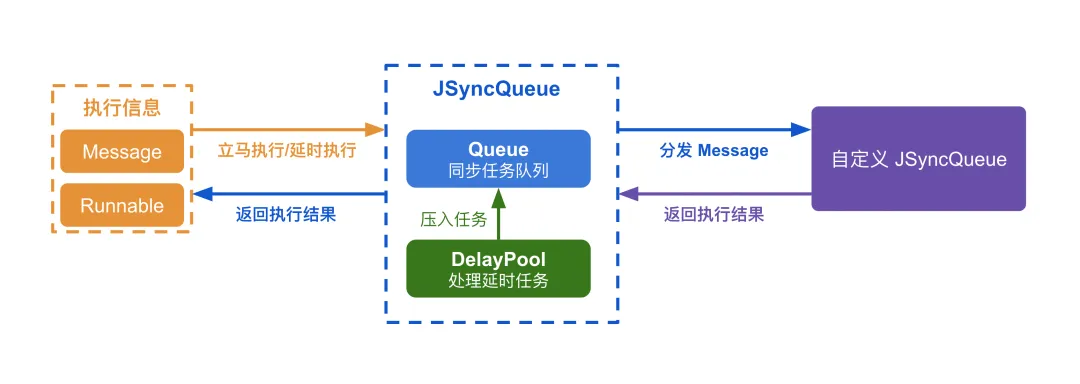
二、如何安装 JSyncQueue
第一种方式: 在需要使用 JSyncQueue 的模块中运行以下命令
ohpm install jsyncqueue
第二种方式: 在需要使用 JSyncQueue 的模块 oh-package.json5 中添加以下依赖
{
"name":"sample",
"version":"1.0.0",
"description":"Please describe the basic information.",
"main":"",
"author":"",
"license":"",
"dependencies":{
"jsyncqueue":"1.0.0"// 添加这一行,请根据需要修改版本号
}
}
三、JSyncQueue API 介绍
3-1、JSyncQueue 类
构造函数
constructor(queueName: string)
创建一个同步队列实例。
- •
queueName: 队列名称,用于标识和调试
方法
| | | |
post(runnable) | runnable: (taskId: number) => Promise<Any> | Task | |
postDelay(runnable, delay) | runnable: (taskId: number) => Promise<Any> | Task | |
sendMessage(message) | message: Message | Task | |
sendMessageDelay(message, delay) | message: Message | Task | |
cancel(taskId) | taskId: number | void | |
clear() | | void | |
dumpInfo() | | string | |
onHandleMessage(message, taskId) | message: Message | Promise<Any> | |
属性
| | |
queueName | string | |
length | number | |
3-2、Message 接口
interfaceMessage {
what: string// 消息类型
data: Any// 消息数据
}
3-3、Task 接口
所有添加的任务,包括“Message 类型任务”和“Runnable 类型任务”,均会返回该类型实例,通过该实例可以“取消任务”、“获取任务结果”、“任务 Id”。
interfaceTask {
cancel(): void// 取消任务
getResult(): Promise<Any>       // 获取任务结果
getTaskId(): number// 获取任务 ID
}
3-4、异常类型
JSyncQueueCancelException
当任务被取消时,会抛出该类型的异常。
interfaceJSyncQueueCancelException {
message: string
}
JSyncQueueException
当 JSyncQueue 内部发生异常时,会抛出该类型的异常。
值得注意:使用者编写的逻辑中抛出的异常会原封不动的抛到 Task.getResult().catch 中,而不是以 JSyncQueueException 类型抛出。
interfaceJSyncQueueException {
message: string
}
四、如何使用 JSyncQueue
4-1、使用 JSyncQueue 创建同步队列
如果你处理的场景均是简单的一次性任务,那么直接使用 JSyncQueue 创建一个同步队列,并压入 Runnable 闭包即可。
以下代码展示的逻辑细节:
- • 代码中使用了 delay 函数模拟了两次耗时操作,并且返回结果
- • 外部通过
Task 类型实例接收返回结果,并且打印 - • 在第四次循环(即 i 为 3)的时候,会模拟抛出异常,异常内容会原封不动的抛到
catch 中
值得注意:
- • 任务结果的接收处理(即对
Task.getResult() 的处理)和 JSyncQueue 对任务的处理是不保证顺序的,因为 Task.getResult() 的处理已不在队列范围内
immediatelyJSyncQueue: JSyncQueue = newJSyncQueue("ImmediatelyJSyncQueue")
for (let i = 0; i < 5; ++i) {
const task = this.immediatelyJSyncQueue.post(async () => {
const delayTime1 = Math.round(Math.random() * 500)
Log.i(TAG, `【添加5个Runnable】执行逻辑 i=${i} 第一段 将会模拟耗时=${delayTime1}`)
awaitthis.delay(delayTime1)

if (i == 3) {
throw { message: "模拟异常" } asError
    }

const delayTime2 = Math.round(Math.random() * 500)
Log.i(TAG, `【添加5个Runnable】执行逻辑 i=${i} 第二段 将会模拟耗时=${delayTime2}`)
awaitthis.delay(delayTime2)

return`jiangpengyong-添加5个Runnable ${i}`
  })
  task.getResult()
    .then((result) => {
Log.i(TAG, `【添加5个Runnable-执行成功】i=${i} result=${result}`)
    })
    .catch((e: Error) => {
Log.e(TAG, `【添加5个Runnable-执行异常】i=${i} e=${JSON.stringify(e)}`)
    })
    .finally(() => {
Log.i(TAG, `【添加5个Runnable-执行结束】i=${i}`)
    })
}

// ========================================= 输出日志 =========================================
// 【添加5个Runnable】执行逻辑 i=0 第一段 将会模拟耗时=239
// 【添加5个Runnable】执行逻辑 i=0 第二段 将会模拟耗时=315
// 【添加5个Runnable】执行逻辑 i=1 第一段 将会模拟耗时=379
// 【添加5个Runnable-执行成功】i=0 result=jiangpengyong-添加5个Runnable 0
// 【添加5个Runnable-执行结束】i=0
// 【添加5个Runnable】执行逻辑 i=1 第二段 将会模拟耗时=391
// 【添加5个Runnable】执行逻辑 i=2 第一段 将会模拟耗时=499
// 【添加5个Runnable-执行成功】i=1 result=jiangpengyong-添加5个Runnable 1
// 【添加5个Runnable-执行结束】i=1
// 【添加5个Runnable】执行逻辑 i=2 第二段 将会模拟耗时=395
// 【添加5个Runnable】执行逻辑 i=3 第一段 将会模拟耗时=478
// 【添加5个Runnable-执行成功】i=2 result=jiangpengyong-添加5个Runnable 2
// 【添加5个Runnable-执行结束】i=2
// 【添加5个Runnable】执行逻辑 i=4 第一段 将会模拟耗时=166
// 【添加5个Runnable-执行异常】i=3 e={"message":"模拟异常"}
// 【添加5个Runnable-执行结束】i=3
// 【添加5个Runnable】执行逻辑 i=4 第二段 将会模拟耗时=33
// 【添加5个Runnable-执行成功】i=4 result=jiangpengyong-添加5个Runnable 4
// 【添加5个Runnable-执行结束】i=4
取消同步任务
通过返回的 Task 类型实例调用 cancel 方法可以进行取消任务。
下面的代码会取消第四次任务,所以在日志中会看到对应的取消异常,并且不会执行该任务。
lettask: Task | undefined
for (let i = 0; i < 5; ++i) {
const tempTask = this.immediatelyJSyncQueue.post(async () => {
const delayTime1 = Math.round(Math.random() * 500)
Log.i(TAG, `【移除Runnable】执行逻辑 i=${i} 第一段 将会模拟耗时=${delayTime1}`)
awaitthis.delay(delayTime1)

const delayTime2 = Math.round(Math.random() * 500)
Log.i(TAG, `【移除Runnable】执行逻辑 i=${i} 第二段 将会模拟耗时=${delayTime2}`)
awaitthis.delay(delayTime2)

if (i == 2) {
throw { message: "模拟异常" } asError
    }
return`jiangpengyong-移除Runnable ${i}`
  })
  tempTask.getResult().then((result) => {
Log.i(TAG, `【移除Runnable】执行成功 i=${i} result=${result}`)
  }).catch((e: Any) => {
Log.e(TAG, `【移除Runnable】执行异常 i=${i} e=${JSON.stringify(e)}`)
  }).finally(() => {
Log.i(TAG, `【移除Runnable】执行完成 i=${i}`)
  })
if (i == 3) {
    task = tempTask
  }
}
Log.i(TAG, `【移除Runnable】取消任务 task=${JSON.stringify(task)}`)
task?.cancel()

// ========================================= 输出日志 =========================================
// 【移除Runnable】执行逻辑 i=0 第一段 将会模拟耗时=263
// 【移除Runnable】取消任务 task={"taskId":13,"queue":{},"promise":{}}
// 【移除Runnable】执行异常 i=3 e={"message":"Cancel task by cancel function."}
// 【移除Runnable】执行完成 i=3
// 【移除Runnable】执行逻辑 i=0 第二段 将会模拟耗时=474
// 【移除Runnable】执行逻辑 i=1 第一段 将会模拟耗时=318
// 【移除Runnable】执行成功 i=0 result=jiangpengyong-移除Runnable 0
// 【移除Runnable】执行完成 i=0
// 【移除Runnable】执行逻辑 i=1 第二段 将会模拟耗时=6
// 【移除Runnable】执行逻辑 i=2 第一段 将会模拟耗时=406
// 【移除Runnable】执行成功 i=1 result=jiangpengyong-移除Runnable 1
// 【移除Runnable】执行完成 i=1
// 【移除Runnable】执行逻辑 i=2 第二段 将会模拟耗时=212
// 【移除Runnable】执行逻辑 i=4 第一段 将会模拟耗时=226
// 【移除Runnable】执行异常 i=2 e={"message":"模拟异常"}
// 【移除Runnable】执行完成 i=2
// 【移除Runnable】执行逻辑 i=4 第二段 将会模拟耗时=439
// 【移除Runnable】执行成功 i=4 result=jiangpengyong-移除Runnable 4
// 【移除Runnable】执行完成 i=4
延时执行 Runnable 类型任务
添加延时任务只需改用 postDelay 方法并传入延时参数
- • 下面代码记录了添加任务到真正执行的延时,通过
realDelay 参数可以查看 - • 使用了
delay 函数模拟了两次耗时操作,并模拟返回了处理结果 - • 第四次任务抛出了异常,异常消息会原封不动的在
catch 的日志展示 - • 因为延时任务的添加是按索引进行累加的,所以添加顺序其实并没变化,从最后的日志输出可以看到保证了执行顺序
for (let i = 0; i < 5; ++i) {
const startTime = systemDateTime.getTime(false)
const delayTime = i * 100
const task = this.delayJSyncQueue.postDelay(async () => {
const endTime = systemDateTime.getTime(false)
const realDelay = endTime - startTime
const delayTime1 = Math.round(Math.random() * 500)
Log.i(TAG, `【添加5个Runnable】执行逻辑 delay=${delayTime} realDelay=${realDelay} i=${i} 第一段 将会模拟耗时=${delayTime1}`)
awaitthis.delay(delayTime1)

const delayTime2 = Math.round(Math.random() * 500)
Log.i(TAG, `【添加5个Runnable】执行逻辑 i=${i} 第二段 将会模拟耗时=${delayTime2}`)
awaitthis.delay(delayTime2)

if (i == 3) {
throw { message: "模拟异常" } asError
    }
return`jiangpengyong-添加5个Runnable ${i}`
  }, delayTime)
  task.getResult()
    .then((result) => {
Log.i(TAG, `【添加5个Runnable】执行成功 i=${i} result=${result}`)
    })
    .catch((e: Error) => {
Log.e(TAG, `【添加5个Runnable】执行异常 i=${i} e=${JSON.stringify(e)}`)
    })
    .finally(() => {
Log.i(TAG, `【添加5个Runnable】执行结束 i=${i}`)
    })
}

// ========================================= 输出日志 =========================================
// 【添加5个Runnable】执行逻辑 delay=0 realDelay=1 i=0 第一段 将会模拟耗时=473
// 【添加5个Runnable】执行逻辑 i=0 第二段 将会模拟耗时=410
// 【添加5个Runnable】执行逻辑 delay=100 realDelay=888 i=1 第一段 将会模拟耗时=178
// 【添加5个Runnable】执行成功 i=0 result=jiangpengyong-添加5个Runnable 0
// 【添加5个Runnable】执行结束 i=0
// 【添加5个Runnable】执行逻辑 i=1 第二段 将会模拟耗时=204
// 【添加5个Runnable】执行逻辑 delay=200 realDelay=1272 i=2 第一段 将会模拟耗时=410
// 【添加5个Runnable】执行成功 i=1 result=jiangpengyong-添加5个Runnable 1
// 【添加5个Runnable】执行结束 i=1
// 【添加5个Runnable】执行逻辑 i=2 第二段 将会模拟耗时=36
// 【添加5个Runnable】执行逻辑 delay=300 realDelay=1721 i=3 第一段 将会模拟耗时=475
// 【添加5个Runnable】执行成功 i=2 result=jiangpengyong-添加5个Runnable 2
// 【添加5个Runnable】执行结束 i=2
// 【添加5个Runnable】执行逻辑 i=3 第二段 将会模拟耗时=483
// 【添加5个Runnable】执行逻辑 delay=400 realDelay=2686 i=4 第一段 将会模拟耗时=9
// 【添加5个Runnable】执行异常 i=3 e={"message":"模拟异常"}
// 【添加5个Runnable】执行结束 i=3
// 【添加5个Runnable】执行逻辑 i=4 第二段 将会模拟耗时=395
// 【添加5个Runnable】执行成功 i=4 result=jiangpengyong-添加5个Runnable 4
// 【添加5个Runnable】执行结束 i=4
取消延时任务
延时任务的取消操作和立即执行的取消操作是完全一样的,都是通过返回的 Task 实例调用 cancel 方法,这里就不再赘述。
4-2、继承 JSyncQueue 创建同步队列
如果你的同步逻辑需要集中管理或进行复用,可以考虑 Message 类型任务。
处理 Message 类型任务,需要继承 JSyncQueue 实现 onHandleMessage 方法,在该方法中会按入队顺序接收到 Message :
- • 通过
Message.what 属性区分不同类别消息实现不同处理逻辑 - • 通过
Message.data 属性可以获取外部传入的数据,数据类型是 Any 可以是任意类型数据,使用者自行转换为真实类型进行逻辑处理
具体操作如下:
- • 定义一个
ImmediatelyQueue 类继承 JSyncQueue ,实现 onHandleMessage 方法 - • 创建一个
ImmediatelyQueue 实例,并通过这个实例进行发送 Message 消息,同步队列会按入队顺序一个个进行分发给该实例的 onHandleMessage 方法进行处理
// 自定义 JSyncQueue
exportclassImmediatelyQueueextendsJSyncQueue {
private count = 0

asynconHandleMessage(message: Message): Promise<Any> {
switch (message.what) {
case"say_hello": {
const name = message.data["name"]
this.count += 1

const delayTime1 = Math.round(Math.random() * 500)
Log.i("ImmediatelyQueue", `【say_hello】执行逻辑 第一段 将会模拟耗时=${delayTime1}`)
awaitthis.delay(delayTime1)

const delayTime2 = Math.round(Math.random() * 500)
Log.i("ImmediatelyQueue", `【say_hello】执行逻辑 第二段 将会模拟耗时=${delayTime2}`)
awaitthis.delay(delayTime2)

if (this.count % 10 == 5) {
throw { message: "模拟异常" }
        }
return`你好,${name}。这是第${this.count}次打招呼。`
      }
// ... 其他 what 处理逻辑
    }
returnundefined
  }

privateasyncdelay(ms: number) {
returnnewPromise<Any>(resolve =>setTimeout(resolve, ms))
  }
}

// 使用逻辑
immediatelyQueue: JSyncQueue = newImmediatelyQueue("ImmediatelyQueue")
for (let i = 0; i < 5; ++i) {
const tempTask = this.immediatelyQueue.sendMessage({
what: `say_hello`,
data: { name: '江澎涌', age: 20 + i },
  })
  tempTask.getResult()
    .then((result) => {
Log.i(TAG, `【添加5个Message】执行成功 i=${i} result=${result}`)
    })
    .catch((e: Error) => {
Log.e(TAG, `【添加5个Message】执行异常 i=${i} e=${JSON.stringify(e)}`)
    })
    .finally(() => {
Log.i(TAG, `【添加5个Message】执行结束i=${i}`)
    })
}
// ========================================= 输出日志 =========================================
// onHandleMessage message={"what":"say_hello","data":{"name":"江澎涌","age":20}}
// 【say_hello】执行逻辑 第一段 将会模拟耗时=92
// 【say_hello】执行逻辑 第二段 将会模拟耗时=143
// onHandleMessage message={"what":"say_hello","data":{"name":"江澎涌","age":21}}
// 【say_hello】执行逻辑 第一段 将会模拟耗时=276
// 【say_hello】执行逻辑 第二段 将会模拟耗时=377
// onHandleMessage message={"what":"say_hello","data":{"name":"江澎涌","age":22}}
// 【say_hello】执行逻辑 第一段 将会模拟耗时=120
// 【say_hello】执行逻辑 第二段 将会模拟耗时=223
// onHandleMessage message={"what":"say_hello","data":{"name":"江澎涌","age":23}}
// 【say_hello】执行逻辑 第一段 将会模拟耗时=424
// 【say_hello】执行逻辑 第二段 将会模拟耗时=444
// onHandleMessage message={"what":"say_hello","data":{"name":"江澎涌","age":24}}
// 【say_hello】执行逻辑 第一段 将会模拟耗时=181
// 【say_hello】执行逻辑 第二段 将会模拟耗时=402
移除 Message 消息
使用 sendMessage 方法压入 “Message 类型任务” 同样会返回 Task 类型实例,调用该实例的 cancel 方法就可以取消该任务。
下列代码会取消第二个任务,所以不会看到 "age":11 的消息。
lettask: Task | undefined
for (let i = 0; i < 5; ++i) {
const tempTask = this.immediatelyQueue.sendMessage({
what: `remove_message`,
data: { name: 'jiang peng yong', age: 10 + i },
  })
  tempTask.getResult().then((result) => {
Log.i(TAG, `【移除Message】执行成功 i=${i} result=${result}`)
  }).catch((e: Any) => {
Log.e(TAG, `【移除Message】执行异常 i=${i} e=${JSON.stringify(e)}`)
  }).finally(() => {
Log.i(TAG, `【移除Message】执行完成 i=${i}`)
  })
if (i == 1) {
    task = tempTask
  }
}
Log.i(TAG, `【移除Message】取消任务 task=${JSON.stringify(task)}`)
task?.cancel()
// ========================================= 输出日志 =========================================
// onHandleMessage message={"what":"remove_message","data":{"name":"jiang peng yong","age":10}}
// 【remove_message】执行逻辑 第一段 将会模拟耗时=497
// 【remove_message】执行逻辑 第二段 将会模拟耗时=397
// onHandleMessage message={"what":"remove_message","data":{"name":"jiang peng yong","age":12}}
// 【remove_message】执行逻辑 第一段 将会模拟耗时=162
// 【remove_message】执行逻辑 第二段 将会模拟耗时=283
// onHandleMessage message={"what":"remove_message","data":{"name":"jiang peng yong","age":13}}
// 【remove_message】执行逻辑 第一段 将会模拟耗时=193
// 【remove_message】执行逻辑 第二段 将会模拟耗时=93
// onHandleMessage message={"what":"remove_message","data":{"name":"jiang peng yong","age":14}}
// 【remove_message】执行逻辑 第一段 将会模拟耗时=359
// 【remove_message】执行逻辑 第二段 将会模拟耗时=145
延时执行 Message 类型任务
- • 定义一个
DelayQueue 类继承 JSyncQueue ,主要重写 onHandleMessage 方法,用于接收处理 Message - • 创建
DelayQueue 实例,通过这个实例调用 sendMessageDelay 方法即可达到相应的延时效果
exportclassDelayQueueextendsJSyncQueue {
private count = 0

asynconHandleMessage(message: Message): Promise<Any> {
Log.i("DelayQueue", `onHandleMessage message=${JSON.stringify(message)}`)
switch (message.what) {
case"say_hello": {
const name = message.data["name"]
this.count += 1

const delayTime1 = Math.round(Math.random() * 500)
Log.i("DelayQueue", `【say_hello】执行逻辑 第一段 将会模拟耗时=${delayTime1}`)
awaitthis.delay(delayTime1)

const delayTime2 = Math.round(Math.random() * 500)
Log.i("DelayQueue", `【say_hello】执行逻辑 第二段 将会模拟耗时=${delayTime2}`)
awaitthis.delay(delayTime2)

if (this.count % 10 == 5) {
throw { message: "模拟异常" }
        }
return`Hello,${name}. This is the ${this.count} th greeting.`
      }
    }
returnundefined
  }

privateasyncdelay(ms: number) {
returnnewPromise<Any>(resolve =>setTimeout(resolve, ms))
  }
}

delayQueue: JSyncQueue = newDelayQueue("DelayQueue")
for (let i = 0; i < 5; ++i) {
const delayTime = i * 100
const task = this.delayQueue.sendMessageDelay({
what: `say_hello`,
data: { name: '江澎涌', age: 20 + i },
  }, delayTime)
  task.getResult()
    .then((result) => {
Log.i(TAG, `【添加5个Message】执行成功 i=${i} result=${result}`)
    })
    .catch((e: Error) => {
Log.e(TAG, `【添加5个Message】执行异常 i=${i} e=${JSON.stringify(e)}`)
    })
    .finally(() => {
Log.i(TAG, `【添加5个Message】执行结束i=${i}`)
    })
}
// ========================================= 输出日志 =========================================
// onHandleMessage message={"what":"say_hello","data":{"name":"江澎涌","age":20}}
// 【say_hello】执行逻辑 第一段 将会模拟耗时=356
// 【say_hello】执行逻辑 第二段 将会模拟耗时=302
// onHandleMessage message={"what":"say_hello","data":{"name":"江澎涌","age":21}}
// 【say_hello】执行逻辑 第一段 将会模拟耗时=67
// 【say_hello】执行逻辑 第二段 将会模拟耗时=344
// onHandleMessage message={"what":"say_hello","data":{"name":"江澎涌","age":22}}
// 【say_hello】执行逻辑 第一段 将会模拟耗时=339
// 【say_hello】执行逻辑 第二段 将会模拟耗时=384
// onHandleMessage message={"what":"say_hello","data":{"name":"江澎涌","age":23}}
// 【say_hello】执行逻辑 第一段 将会模拟耗时=442
// 【say_hello】执行逻辑 第二段 将会模拟耗时=392
// onHandleMessage message={"what":"say_hello","data":{"name":"江澎涌","age":24}}
// 【say_hello】执行逻辑 第一段 将会模拟耗时=443
// 【say_hello】执行逻辑 第二段 将会模拟耗时=199
取消延时的 Message 类型任务
延时任务的取消操作和立即执行的取消操作是完全一样的,都是通过返回的 Task 实例调用 cancel 方法,这里就不再赘述。
同一队列压入 Message 类型任务和 Runnable 类型任务
对 JSyncQueue 同一实例压入 Message 和 Runnable 两种类型任务是支持的,会按照压入顺序进行执行和分发。
// ImmediatelyQueue 源码就不再展示,需要可以移步 Github 上查阅
immediatelyQueue: JSyncQueue = newImmediatelyQueue("ImmediatelyQueue")
for (let i = 0; i < 10; ++i) {
if (i % 2 == 0) {
this.immediatelyQueue.post(async () => {
const delayTime1 = Math.round(Math.random() * 500)
Log.i(TAG, `【添加10个Message和Runnable】执行逻辑 i=${i} 第一段 将会模拟耗时=${delayTime1}`)
awaitthis.delay(delayTime1)

const delayTime2 = Math.round(Math.random() * 500)
Log.i(TAG, `【添加10个Message和Runnable】执行逻辑 i=${i} 第二段 将会模拟耗时=${delayTime2}`)
awaitthis.delay(delayTime2)

if (i / 2 == 3) {
throw { message: "模拟异常" } asError
      }
return`小朋友-添加10个Message和Runnable ${i}`
    })
  } else {
this.immediatelyQueue.sendMessage({
what: `say_hello`,
data: { name: '小朋友', age: i },
    })
  }
}
// ========================================= 输出日志 =========================================
// 【添加10个Message和Runnable】执行逻辑 i=0 第一段 将会模拟耗时=416
// 【添加10个Message和Runnable】执行逻辑 i=0 第二段 将会模拟耗时=41
// onHandleMessage message={"what":"say_hello","data":{"name":"小朋友","age":1}}
// 【say_hello】执行逻辑 第一段 将会模拟耗时=184
// 【say_hello】执行逻辑 第二段 将会模拟耗时=63
// 【添加10个Message和Runnable】执行逻辑 i=2 第一段 将会模拟耗时=451
// 【添加10个Message和Runnable】执行逻辑 i=2 第二段 将会模拟耗时=223
// onHandleMessage message={"what":"say_hello","data":{"name":"小朋友","age":3}}
// 【say_hello】执行逻辑 第一段 将会模拟耗时=99
// 【say_hello】执行逻辑 第二段 将会模拟耗时=27
// 【添加10个Message和Runnable】执行逻辑 i=4 第一段 将会模拟耗时=273
// 【添加10个Message和Runnable】执行逻辑 i=4 第二段 将会模拟耗时=193
// onHandleMessage message={"what":"say_hello","data":{"name":"小朋友","age":5}}
// 【say_hello】执行逻辑 第一段 将会模拟耗时=20
// 【say_hello】执行逻辑 第二段 将会模拟耗时=231
// 【添加10个Message和Runnable】执行逻辑 i=6 第一段 将会模拟耗时=46
// 【添加10个Message和Runnable】执行逻辑 i=6 第二段 将会模拟耗时=198
// onHandleMessage message={"what":"say_hello","data":{"name":"小朋友","age":7}}
// 【say_hello】执行逻辑 第一段 将会模拟耗时=179
// 【say_hello】执行逻辑 第二段 将会模拟耗时=0
// 【添加10个Message和Runnable】执行逻辑 i=8 第一段 将会模拟耗时=131
// 【添加10个Message和Runnable】执行逻辑 i=8 第二段 将会模拟耗时=401
// onHandleMessage message={"what":"say_hello","data":{"name":"小朋友","age":9}}
// 【say_hello】执行逻辑 第一段 将会模拟耗时=452
// 【say_hello】执行逻辑 第二段 将会模拟耗时=40
4-3、取消队列中所有任务
对 JSyncQueue 实例调用 clear 方法,就会把队列中等待执行的任务,包括延时执行和立即执行的任务,全都取消。同时会抛出 JSyncQueueCancelException 类型异常。
for (let i = 0; i < 5; ++i) {
const task = this.immediatelyQueue.post(async () => {
const delayTime1 = Math.round(Math.random() * 500)
Log.i(TAG, `【清空队列】执行逻辑 i=${i} 第一段 将会模拟耗时=${delayTime1}`)
awaitthis.delay(delayTime1)

const delayTime2 = Math.round(Math.random() * 500)
Log.i(TAG, `【清空队列】执行逻辑 i=${i} 第二段 将会模拟耗时=${delayTime2}`)
awaitthis.delay(delayTime2)

return`小朋友-清空队列 ${i}`
  })
  task.getResult()
    .then((result) => {
Log.i(TAG, `【清空队列】执行成功 i=${i} result=${result}`)
    })
    .catch((e: Error) => {
Log.e(TAG, `【清空队列】执行异常 i=${i} e=${JSON.stringify(e)}`)
    })
    .finally(() => {
Log.i(TAG, `【清空队列】执行结束 i=${i}`)
    })
}
this.immediatelyQueue.clear()
// ========================================= 输出日志 =========================================
// 【清空队列】执行逻辑 i=0 第一段 将会模拟耗时=14
// 【清空队列】执行异常 i=1 e={"message":"Cancel task by clear function."}
// 【清空队列】执行异常 i=2 e={"message":"Cancel task by clear function."}
// 【清空队列】执行异常 i=3 e={"message":"Cancel task by clear function."}
// 【清空队列】执行异常 i=4 e={"message":"Cancel task by clear function."}
// 【清空队列】执行结束 i=1
// 【清空队列】执行结束 i=2
// 【清空队列】执行结束 i=3
// 【清空队列】执行结束 i=4
// 【清空队列】执行逻辑 i=0 第二段 将会模拟耗时=125
// 【清空队列】执行成功 i=0 result=小朋友-清空队列 0
// 【清空队列】执行结束 i=0
五、作者博客
掘金:https://juejin.im/user/5c3033ef51882524ec3a88ba/posts
csdn:https://blog.csdn.net/weixin_37625173
公众号:微信搜索 "江澎涌"